 Seaglass
Download 1.1.1
Badges
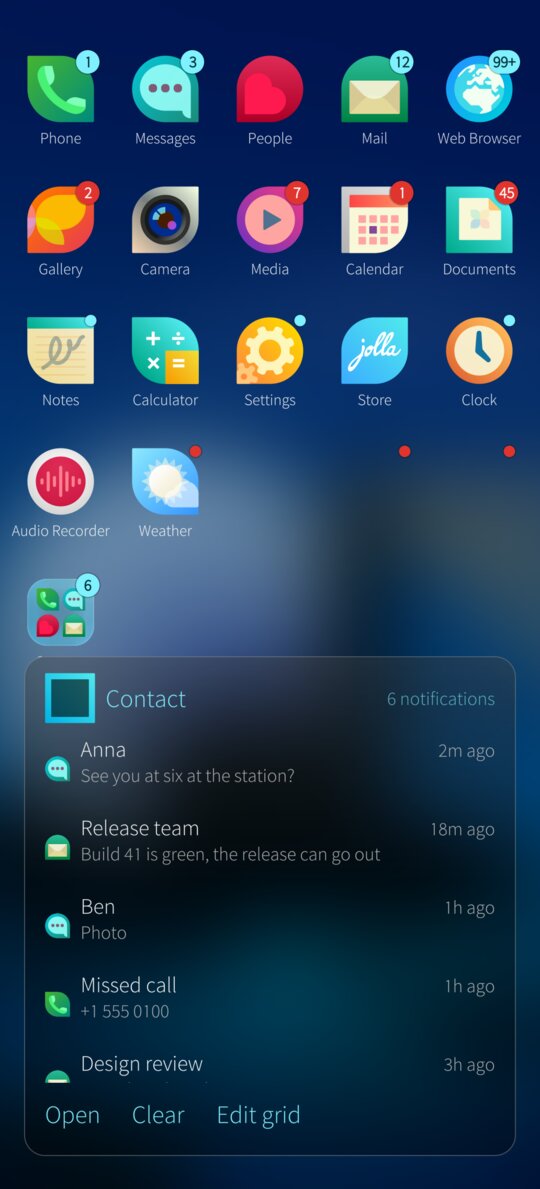
The stock app grid does not show which apps have notifications. Seaglass puts a badge on their icons, and on folders, cards and the search. Holding a badged app or folder shows its notifications.
What you see
A badge counts the app's notifications in the Events view, up to 99+. A notification for five messages counts as
five. A folder shows the sum of its apps, and the search capsule shows dots. The settings are on the Badges page
(Settings → Patchmanager → Seaglass), in dconf under /apps/seaglass/badges:
| Setting | Key | Values (default first) |
|---|---|---|
| Notification badges | show |
on, off |
| Style | style |
count, dot |
| Colour | tone |
accent (the ambience's highlight colour), red |
| On folders and cards | folders |
on, off (off hides the folder sums and the badges on cards) |
| Long press shows notifications | peek |
on, off |
With the peek on, a long press on a badged app or folder opens a glass card by it, instead of the edit mode. The card lists the notifications newest first: an app's own, or a folder's apps' together, each with its app's icon. Four and a half fit; more scroll. A tap on one runs its own action, as in the Events view. Open runs the newest one's action (or opens the app; for a folder, opens the folder), Clear removes the removable ones, and Edit grid starts the edit mode the long press would have started. An icon without a badge keeps the stock long press.
How it works
BadgeSource.qml reads the home screen's own JollaNotificationListModel
(com.jolla.lipstick), the model behind the Events view, with its filter (no x-nemo.system-update), so the two
agree. HomeController.qml loads it through a Loader, as the module exists only inside Lipstick.
A notification does not name its launcher item. The source tries these, and the first match wins:
- the
x-nemo-origin-packagehint against the app'sX-apkd-packageName(Android apps); owner(or thex-nemo-ownerhint) against the desktop file's name;- the file name of
appIconagainst the app'siconId; appName, thendisambiguatedAppName, against the app's title, ignoring case and accents.
Unique fields come first. When two apps share an icon or a title, the later one in the launcher wins. The apps and
their folders come from the search's entries (SEARCH.md). Any change restarts a 200 ms timer, then
the source counts again. Each notification adds its itemCount, or 1. Badges read badgeCount(item) through a
revision number, so they update once per count.
IconBadge.qml puts a Badge.qml on an icon's corner. The
hook (ARCHITECTURE.md) adds two things to the LauncherGrid.qml delegate:
- a Loader of IconBadge.qml as the last child of LauncherIcon, so the badge moves and scales with the icon;
- at the start of onPressAndHold, a return when the app's badge or the folder's preview
(FolderPreview.qml, which draws a folder's badge) opened the peek. Without a
badge, or without a peek, the stock long press runs.
The peek opens when the long press fires, not on release: waiting for the release would mean changing the stock drag code. Folder icons, cards and the search add their badges in our own files, with no more hook lines. A folder's notifications are its apps', gathered from the search's entries (the apps with that folder's title).
While the card is open, the pager stands still, and so does the compositor's launcherInteractiveArea, which would
otherwise take a pull down on the list and close the app grid (WIDGETS.md does the same for the
gallery).
Checking the matching
The harness has no notification manager, so matching is checked on the phone. Turn on Debug log (the About
page of the settings). Each notification is then logged once with its identity fields, the desktop file it matched
(matched, or -) and the rule (by), never its text. Each count adds a line such as
seaglass: badges 4 apps, 9 notifications, 1 without an app. With a few notifications waiting, run
make journal (DEVELOPMENT.md). With Debug log off, none of this runs.
Costs
A second notification model in the home screen, listing the same objects as the Events view's. A recount after a change, one pass over the apps and one over the notifications. A hidden badge in each app icon, drawn only when there is a notification.
Limits
- A notification that matches no app gets no badge: mostly system services, or apps whose notifications name neither their desktop file, icon nor title.
- A badge stays until the app removes its notifications or they are cleared in the Events view. Clear leaves the ones that cannot be removed.
- Folder sums go by title, so two folders with the same title show the same sum.
- The peek opens from app and folder icons in the app grid and from apps in open folders, not from cards or the search. With it on, a badged app or folder is moved from Edit grid.
The code
- BadgeSource.qml: the model, the matching, the counting and the debug lines.
- NotificationPeek.qml: the peek card.
- HomeController.qml:
badgeCount(),peekAt(), Open and Clear. - FolderPreview.qml: a folder's badge, and its
peek()for the hook. - BadgeSettings.qml and BadgesPage.qml.