 Seaglass
Download 1.1.1
Install and use
Widgets, glass, app search, notification badges, a richer task switcher and app animations for the Sailfish OS home screen.
Seaglass extends the stock home screen, and every part of it is a setting that can be switched off. It never changes the home screen's files on disk: a Patchmanager patch of a few lines loads Seaglass's QML, and wherever that cannot load, the stock home screen stays. It is free software, tested on a Jolla Phone.

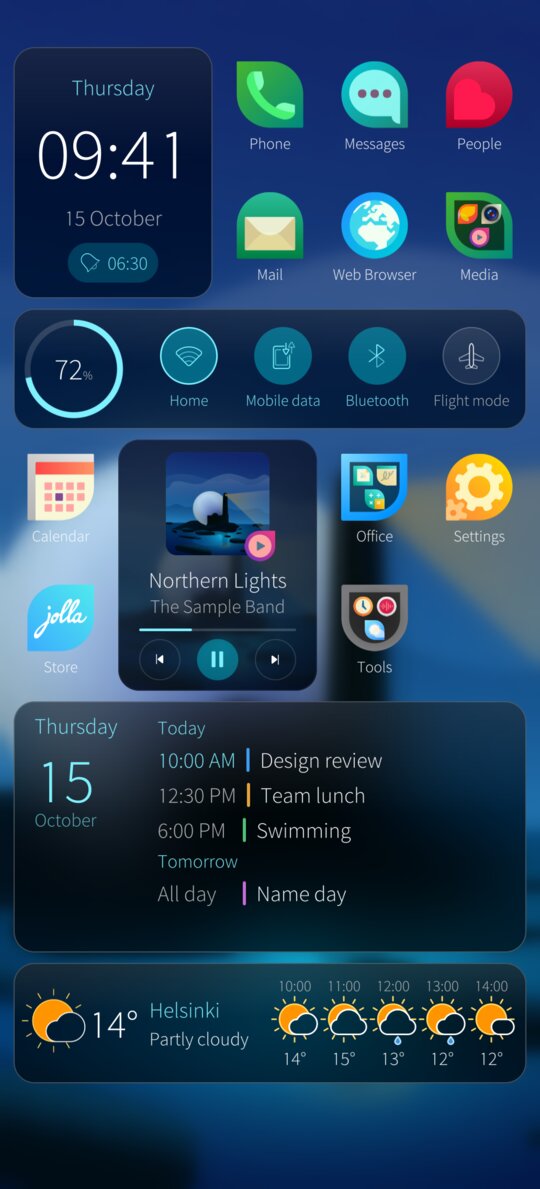
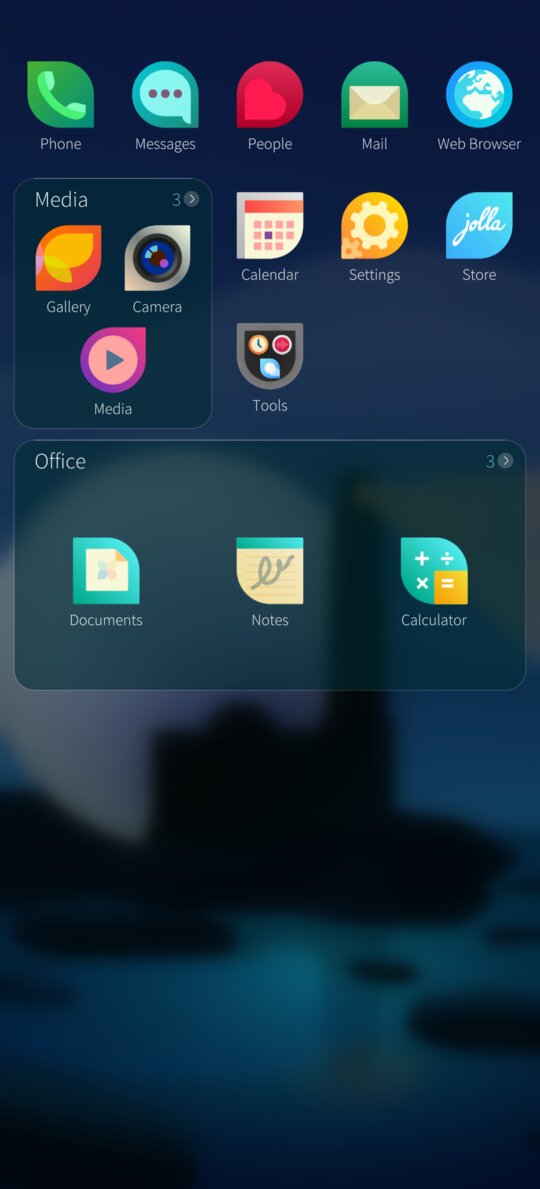
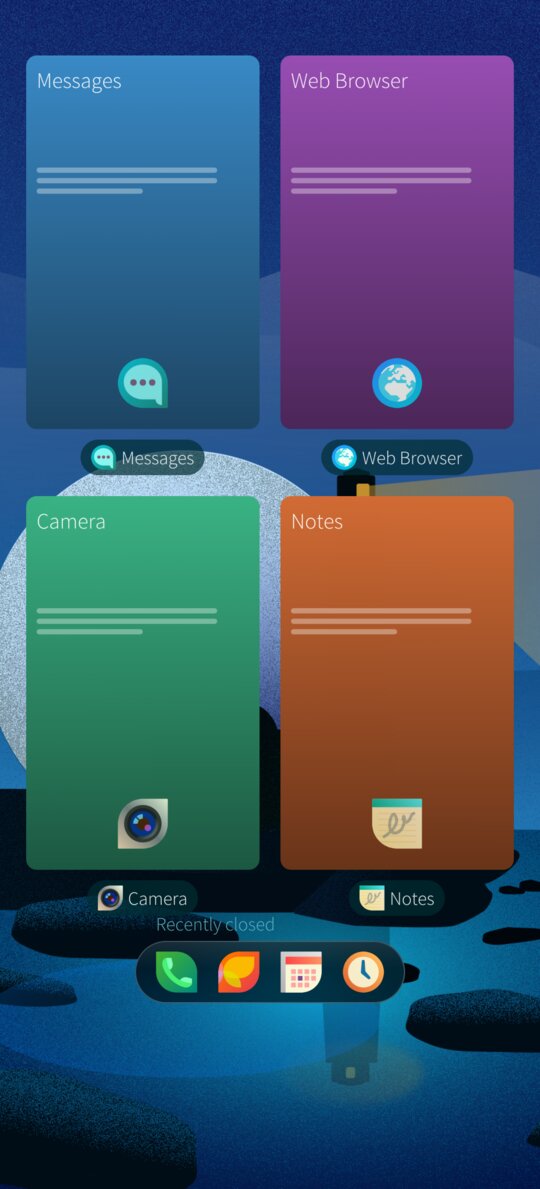
The images and animations come from the development harness, which uses only the stock apps, a stock ambience and sample data.
Features
Data widgets
Live information as glass blocks among the icons:
- a clock, digital or analogue, with the date and the next alarm;
- the status: the battery, and Wi-Fi, mobile data, Bluetooth and flight mode as chips that switch with a tap;
- now playing: the album art, the track, the progress and the player's buttons;
- the next event: the coming events in their calendars' colours, with an option to hide their details;
- the weather: the Weather app's place now, and the next hours or days.
A fresh install starts with the clock and the status. In the edit mode, Add widget opens a gallery with live previews of each size. A widget moves like an icon, and its size pill makes it a card, a shelf or a panel. More: docs/WIDGETS.md.
Glass
The app grid rises over the home screen's wallpaper, which stays sharp under it (Clear, the default) or frosts like glass as the grid comes up (Glass). The wallpaper eases back as the grid opens and follows the pages more slowly than the icons; tilt and drift are optional. The picture of another ambience, or a photo, can take its place: it rises from below and blends in as the grid opens. Folder icons, open folders and widget cards are glass too, and Stock keeps the Sailfish background. More: docs/GLASS.md.
App animations
Apps can open from the icon or cover you tapped, show a loading effect on their new cover while they start, and close with the swipe from the top, in one of twelve styles: Contour, Fold and Halftone (drawn, folded and printed), Seaglass, Tide and Northern lights (calm, made of glass, water and light), Ember, Volt and Frost (fire, lightning and ice), and Shatter, Singularity and Dust (loud on purpose). The settings page shows every style's opening, loading and closing at once, and plays any of them before you choose. The effects are shaders on a copy of the window, so Sailfish never waits for them. Out of the box the animations are on with Surprise me, a different style each time. With Surprise me off, apps open in Ember, load in Dust and close in Northern lights until you choose others. More: docs/ANIMATIONS.md.
Folders
- Previews. A folder shows small icons of its apps instead of the bare item count, in its own shape and colour. While an app is held over a folder, the slot where it will land pulses.
- Folders as widgets. A folder can open out into a glass tile on the app grid, whose apps start with one tap: a card (two by two cells), a shelf (the full width, one row) or a panel (the full width, two rows). It sits anywhere among the icons, which flow around it. In the edit mode it moves by dragging, changes size and takes apps dropped on it.
- Motion. A folder opens from its icon or widget and closes back into it: zoom (the default), spring, reveal or slide. Its apps ripple in, and the app grid steps back. The stock fade is there too.
More: docs/FOLDERS.md.
App search
A glass pill on the first page of the app grid holds the five apps you use most. A tap on it opens a sheet:
- before you type: the apps used most, and every app from A to Z with a letter rail;
- as you type: the matches, best first. Accents don't matter, and word starts, initials, folder names and desktop file names match too. Enter starts the first match.
More: docs/SEARCH.md.
Notification badges
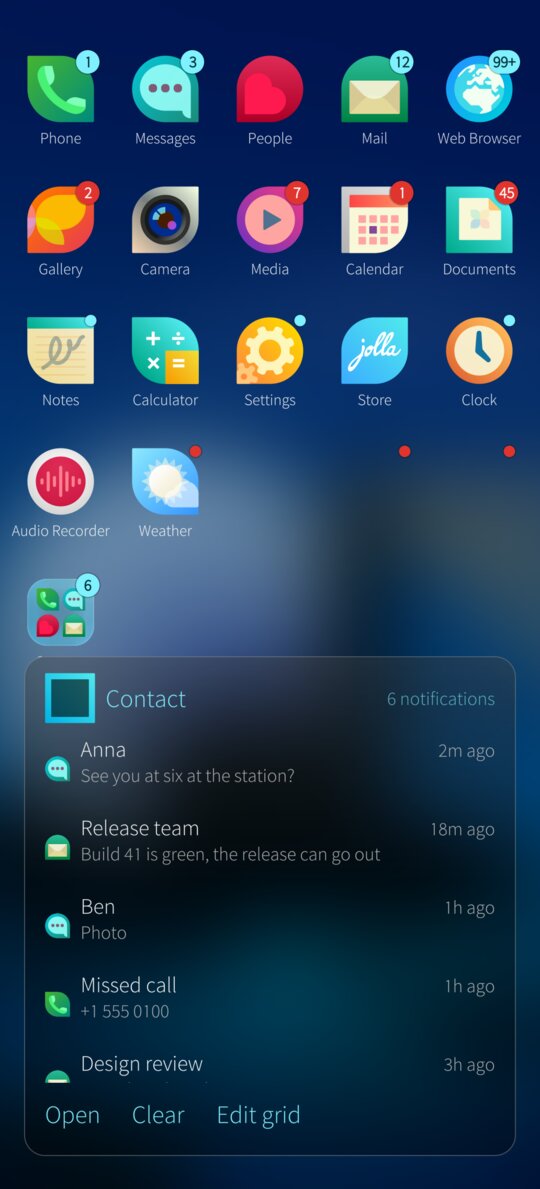
Apps with notifications show how many on their icons, as a count or a dot. Folders, cards and the search show them too, and they follow the Events view live. A long press on an app or a folder with a badge shows its notifications, to open or clear them; Edit grid there starts the edit mode. More: docs/BADGES.md.
Task switcher
- Each cover gets a chip with its app's icon and name.
- A Recently closed capsule starts closed apps again.
- An optional card row puts the last used app in front, and a card pulled up closes its app.
- A pinch switches between the grid and the card row, following the fingers.
More: docs/SWITCHER.md.
What changed in each version: CHANGELOG.md.
Compatibility
Seaglass patches the stock home screen of particular Sailfish OS versions, so each version is checked on its own, and
Patchmanager applies the patch only to the versions listed in the package's patch.json.
| Sailfish OS | Package | Checked by CI | On a phone | Status |
|---|---|---|---|---|
| 5.2.0.22 | release | the hook | Jolla Phone (lipstick-jolla-home-qt5 1.27.18.2) |
status |
| 5.2.0.20 | release | the hook | Jolla Phone (lipstick-jolla-home-qt5 1.27.18.1) |
status |
| 5.2.0.18 | release | the hook | Jolla Phone | status |
| 5.1.0.11 | testers' | the hook; the QML with the 5.1.0.11 SDK target | not yet | status |
| 5.0.0.78 | testers' | the hook; the QML with the 5.0.0.62 SDK target | not yet | status |
- Release versions are in the
patch.jsonof the package on the releases page, and have run on a phone. - Testers' versions are in each release's testers' package as well (
seaglass-VERSION-0.preview1). CI checks them, but they have not run on such a phone yet. If you try one, the Older Sailfish OS form is the place to say how it went; a version moves into the release once it has run on a phone. - The hook is generated from that version's stock home screen, downloaded from Jolla's repository and checked
against its SHA-256. CI requires it to be exactly the committed one, to apply with
patch -p1without fuzz or offsets, and to passqmllint. - The QML is compiled with that release's own Qt 5.6 and Silica, from the Sailfish SDK's build target. Jolla publishes none for 5.2 yet, so on 5.2 the QML is checked on a phone.
- CI also runs the unit tests and the static checks (qmllint, shellcheck, actionlint, and glslangValidator for the shaders), and builds the package and the site.
Install
You need:
- Sailfish OS 5.2.0.22, 5.2.0.20 or 5.2.0.18 (see Compatibility);
- Patchmanager 3.2 or newer, from OpenRepos or Chum.
The package also needs lipstick-jolla-home-qt5, sailfishsilica-qt5 and qt5-qtdeclarative-import-folderlistmodel,
which Sailfish OS has.
- Install the
seaglassRPM from the releases page. From a terminal:devel-su pkcon install-local seaglass-*.noarch.rpm
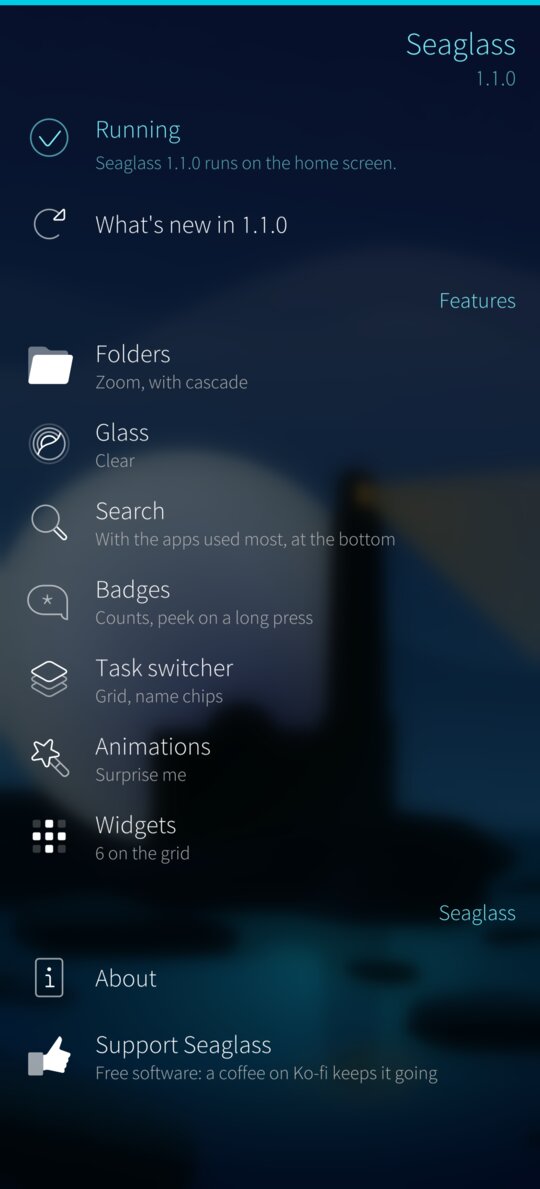
Without a terminal: turn on Settings → Untrusted software, then open the downloaded RPM in the File manager and install it. 2. Open Settings → Patchmanager, activate Seaglass, and let Patchmanager restart the home screen. 3. Tap Seaglass in Patchmanager for its settings. The first page says whether Seaglass runs, and what to do if it does not. Each feature has a page of its own, and changes apply at once.
If the app grid does not come up after you activate the patch, reboot the phone. With Patchmanager's Activate on boot off, the phone starts with the stock home screen.
Updating and removing
Updating. The package takes the patch out of the home screen before an update, and if it was active, activates
it again afterwards. Then restart the home screen, from Patchmanager's pulley menu or with
systemctl --user restart lipstick. Storeman does not show the package's messages, so it won't remind you.
Going back to an older version. Deactivate Seaglass in Patchmanager first.
After a Sailfish OS update. Patchmanager applies the patch only if this version of Seaglass lists the new Sailfish
OS version in its patch.json. Otherwise, wait for a version of Seaglass that does.
Backup. Back up on the settings' About page saves the settings, the widgets and the folder types to a file in Documents. Restore reads such a file back, on another phone or after a reflash. The order of the apps belongs to the launcher, and is not in the backup.
Removing. Deactivate Seaglass in Patchmanager, or remove the package: devel-su rpm -e seaglass. Removing the
package deactivates the patch first. Folders shown as widgets go back to being ordinary folders, in their places in
the app grid. The settings stay in dconf, in case you install it again; to clear them as well:
dconf reset -f /apps/seaglass/. The Animations page's picture of its frames stays in ~/.cache too:
rm ~/.cache/seaglass-animations-*
Privacy
- Seaglass reads only what the stock home screen and its Events view already read: the launcher's apps and folders, notifications, the calendar, the media player, the Weather app's saved place, and the connection and battery states.
- It stores its settings, the app launch counts and the recently closed apps in dconf (
/apps/seaglass), on the phone only. Forget used apps and Forget closed apps in the settings clear them. The Animations page keeps one picture of its frames in~/.cache, drawn from a made-up app and stock icons only. - It sends nothing anywhere. The weather widget uses the stock weather module, whose requests follow the stock Events view's rules. Support Seaglass in the settings opens Ko-fi in the browser, only when you tap it.
- It writes nothing to the system journal unless Debug log is on.
Troubleshooting
The patch is active, but the home screen looks stock. Patchmanager reaches the home screen through
/usr/lib64/libpreloadpatchmanager.so in /etc/ld.so.preload. That file belongs to the device adaptation package
(droid-config-jp2601 on the Jolla Phone), and a Sailfish OS update can replace it without Patchmanager's line, as
5.2.0.20 did. Patchmanager then still shows its patches as active, but none of them reaches any app. The package
warns about this when it is installed, and so does the first page of Seaglass's settings. To put the line back, run
this, then restart the home screen:
devel-su sh -c "sed -i '/libpreloadpatchmanager/ d' /etc/ld.so.preload; echo /usr/lib64/libpreloadpatchmanager.so >> /etc/ld.so.preload"
Reinstalling Patchmanager does the same.
Debug log. On the About page of Seaglass's settings (off by default; dconf /apps/seaglass/debug). When it is on,
the home screen's journal gets Seaglass's diagnostics, each line starting with seaglass::
- how each notification matched its app (its identity fields, never its text);
- the pinch's timing;
- the grid's corrections;
- the app animations: where an app opens from, and which style plays.
The switch takes effect at once. Read the lines with devel-su journalctl -b | grep seaglass:.
How it works
lipstick-jolla-home-qt5 (stock QML, unchanged on disk)
  └─ Patchmanager applies the hook in memory, in eight stock files
       └─ each hook is a Loader of a file from /usr/share/seaglass/qml/
            failed to load → that part of the home screen stays stock
The hook is generated from anchors in the stock files, and it refuses to apply when they move. Only root-owned QML from the package runs in the home screen. Details are in docs/ARCHITECTURE.md.
Building from source
Seaglass is noarch QML, built and checked on Linux or macOS with Docker and Python 3; no Sailfish SDK is needed.
make test         # unit tests: the hook, the layout and search engines, the widget store, repository consistency
make lint         # qmllint, shellcheck, actionlint, the shaders with glslangValidator
make rpm          # out/rpm/seaglass-VERSION-1.noarch.rpm (CHANNEL=preview: the testers' package)
make check-hooks  # the hook against every Sailfish OS version, downloaded from Jolla
make site         # the GitHub Pages site, into out/site/
The phone side (deploying, the development harness, screenshots) and releasing are in docs/DEVELOPMENT.md.
Contributing
Bug reports, reports from phones and Sailfish OS versions I don't have, and pull requests are welcome; CONTRIBUTING.md says what helps. Please report security problems privately, as SECURITY.md describes.
Support
Seaglass is free software and stays free. If it makes your phone a little nicer, a coffee on Ko-fi helps keep it going: new Sailfish OS versions, fixes and new features. The same page supports the developer's other Sailfish OS apps.
License
Copyright (C) 2026 Syrtis Major
Seaglass is free software: you can redistribute it and/or modify it under the terms of the GNU General Public License as published by the Free Software Foundation, either version 3 of the License, or (at your option) any later version. It comes with no warranty; see LICENSE for the details.
The context lines in patchmanager/diffs/ are excerpts of Jolla's proprietary lipstick-jolla-home-qt5, as in
every Patchmanager patch, and the GPL does not cover them. Sailfish OS and
Jolla are trademarks of their owners; Seaglass is a community project, not made or endorsed by them.